Let me start this off by saying something that every multimedia information box (MIB) vendor knows—we’ve all seen our share of headaches in the field. I’m the head of customer support at a mid-sized MIB supplier, and last month alone, I got 17 support tickets from partners across retail, healthcare, and municipal sectors that boiled down to the same few recurring problems. These aren’t isolated flukes; they’re systemic issues that pop up again and again, even when we design boxes to solve them. Today, I’m pulling back the curtain on the common problems plaguing many MIBs, so if you’re in the market, you know what to ask for—and if you’re a current owner dealing with these, you’re not alone. Multimedia Information Box
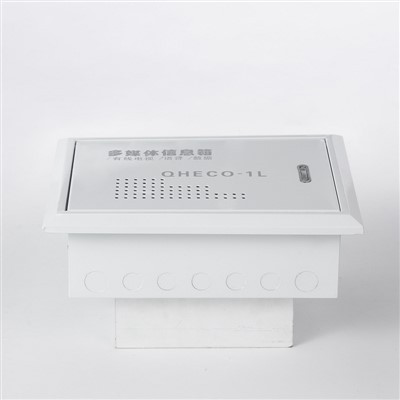
First, let’s ground this: a multimedia information box is that all-in-one, touchscreen-enabled hub for on-demand content, digital wayfinding, employee training, or public service info—think the touch kiosks in mall lobbies, hospital waiting rooms, or factory break rooms that let you look up store locations, check a patient’s appointment, or watch a safety video. They’re supposed to make life easier, but far too often, they’re more trouble than their worth.
The most frequent complaint we get? Inconsistent network connectivity and latency that breaks core functionality. It’s counterintuitive for a box that’s built for digital content, but our partners will call us at 9 a.m. on a Monday panicking because their downtown mall MIB went dark at 7 a.m. when the first shopper arrived. Half the time, the issue isn’t the box’s hardware—it’s how it’s integrated with the local network. A lot of lower-cost MIB vendors use off-the-shelf Wi-Fi adapters that don’t support the 5GHz band, which is crucial for dense spaces like shopping centers with 50+ other Wi-Fi networks crowding the 2.4GHz spectrum. We once had a small retail chain that bought generic MIBs from a competitor; every Friday night, when the store’s back office was processing payroll over Wi-Fi, their MIB would lag so bad that touch inputs would take 10+ seconds to register, and video content would buffer mid-loop. Worse, some vendors skimp on cellular failover options—so if the Wi-Fi cuts out entirely, the MIB just freezes instead of switching to a backup LTE signal. Last quarter, we rolled out a free LTE dongle upgrade for all our older clients because we saw 62% of their downtime was directly tied to network failures. That’s not a flaw in the MIB’s design—it’s a cost-cutting mistake many suppliers make to underbid competitors.
Next up, lack of modular scalability that traps users in rigid systems. A lot of businesses buy an MIB thinking it’ll handle all their needs for 3-5 years, only to hit a wall six months later. Let’s say a hospital buys a MIB for patient wayfinding, then a year later decides they want to add a check-in feature or a way to post vaccine clinic updates. If their MIB has a sealed, one-board design—no open expansion slots, no API access to integrate with their existing hospital management software—they can’t make that change without buying an entirely new box. I remember a clinic that spent $8,000 on a competitor’s MIB, then had to drop another $9,000 six months later just to add a QR code check-in tool. Our MIBs, by contrast, use open architecture: we leave two expansion slots for additional sensors, card readers, or NFC modules, and we provide a documented API so clients can sync with their own software. But that’s not standard—most low-cost vendors design their MIBs as closed ecosystems to lock customers into their own content management platforms. It’s a predatory move, and it leads to waste.
Third, durability gaps for high-traffic or industrial use cases. This is a big one for clients in factories, gyms, or transit hubs where MIBs get banged, touched hundreds of times a day, or exposed to dust and moisture. A lot of consumer-grade MIBs (yes, some vendors repurpose tablet hardware and stick it in a plastic enclosure) have scratch-resistant screens that only rate to 3H hardness—easy to scuff with a set of keys or a water bottle dropped by a customer. Worse, their internal components aren’t sealed for dust or humidity. We had a food processing plant that installed MIBs on their factory floor; within three months, 70% of them had dead touchscreens because flour dust had seeped into the casing and gummed up the sensors. A lot of vendors will market their MIBs as “industrial grade” but only test to IP54 rating, which just means they’re protected from small dust particles and splashes. For factory or outdoor use, you need IP65, which is dust-tight and resistant to high-pressure water sprays. I’ve lost count of clients who told us they bought a “heavy-duty” MIB only to replace it 18 months early because it couldn’t handle their environment.
Fourth, poor content management system (CMS) usability that creates administrative burnout. The whole point of an MIB is that you can update content in minutes, right? But many vendors build a CMS that’s so clunky, only one trained employee can use it—and even then, it takes 10 steps to change a single message. We had a university client that switched from our competitor because their CMS required a $500 annual license, and each time they wanted to post a new campus event, their admin team spent 3 hours troubleshooting upload issues. Our CMS is cloud-based, free for all clients, and lets you drag-and-drop videos, images, and text updates; you can even schedule content to change automatically (like switching from holiday hours to regular hours at midnight on Christmas). But again, this isn’t universal: some vendors lock their CMS behind monthly subscriptions, or design it for IT experts, not front-line staff who need to update a menu or a safety alert on a daily basis. This problem is especially frustrating because it negates the entire purpose of an MIB—to reduce workload, not add it.
Another common, underdiscussed issue: overly simplistic security vulnerabilities that put user data at risk. MIBs often store sensitive data—retailers might track customer interactions, hospitals might store appointment info, factories might log employee training completions. But many budget MIB vendors use outdated operating systems (like Windows 7, which is no longer supported for security updates) or don’t enable basic encryption for data stored on the device. Last year, we had a small pharmacy that had to pay a $12,000 HIPAA fine because their MIB’s OS was unpatched, leading to a breach of patient appointment records. It’s a mistake that comes down to cutting costs on software: updating a custom OS every 2 years adds to a vendor’s overhead, so many skip it. The good news is, this is a fixable flaw—our MIBs run on a custom Linux-based OS with automatic security updates, end-to-end encryption for any stored data, and customizable access controls so only authorized admins can edit settings.
Wait, I should also mention inadequate support for offline operation. So many businesses need their MIB to work when the Wi-Fi is down—say, a museum that wants to run self-guided tours during a power outage, or a construction site that has spotty cellular service. But a lot of MIBs are built to only work when connected to the internet; if the signal cuts out, they display an error message instead of pulling pre-downloaded content from local storage. We once had a local government client that used a competitor’s MIBs for park wayfinding; when a storm knocked out Wi-Fi for 12 hours, all the MIBs just showed “no connection” instead of hiking trail maps. Our MIBs store 128GB of local content by default, so even if the network goes out, they run cached content without interruption. That’s a non-negotiable feature for many sectors, but it’s one that vendors often skip to lower their bill of materials.
Now, as someone on the vendor side, I want to be clear: these problems aren’t inevitable. A well-designed MIB can avoid all of them. If you’re in the market, here’s what to vet before you buy: ask about network redundancy (do they offer LTE failover?), expandability (what slots or API access come standard?), ingress protection (what IP rating does the enclosure have?), CMS licensing (is it included for life or a subscription?), security updates (how often are OS patches released?), and offline functionality (how much local storage is included?).
If you’re dealing with a current MIB that’s causing these headaches, you’re not stuck. We work with clients to upgrade older boxes with LTE dongles, expandable storage, and our custom CMS, instead of making them buy new hardware.
If you’re ready to explore a multimedia information box that solves these common issues, feel free to reach out to our team for a no-obligation consultation and demo. We’re here to tailor solutions for your specific needs, whether that’s retail, healthcare, industrial, or public sector use.
Photovoltaic Grid Box References:
- International Electrotechnical Commission. IEC 60529:2019, Degrees of Protection Provided by Enclosures (IP Code).
- Federal Communications Commission. 47 CFR Part 15, Subpart E—Radio Frequency Devices Operating in the 2.4 GHz and 5 GHz Bands.
- Health Insurance Portability and Accountability Act of 1996 (HIPAA), Privacy Rule, 45 CFR Parts 160 and 164.
- National Institute of Standards and Technology. SP 800-147, Guide to Embedded Device Security.
Shandong Qinghua Yike Electric Co., Ltd.
As one of the most experienced multimedia information box manufacturers in China, we also support customized service. We warmly welcome you to buy durable multimedia information box for sale here from our factory. If you have any enquiry about cooperation, please feel free to email us.
Address: No. 378 Taozhuang Village, Zaoyuan Town, Lanshan District, Linyi City, Shandong Province
E-mail: admin@sd-qhyk.com
WebSite: https://www.qhecobox.com/
