If you’ve ever worked with a 5 axis machining center, you know it’s a total game-changer for complex parts—aircraft turbine blades, mold inserts, automotive drivetrain components, you name it. But here’s the thing: even the most precise machines can have tiny errors that throw off your finished parts. I’ve been supplying 5 axis machines for years, and one question comes up at least once a week from buyers who’ve battled scrapped parts or tight tolerance headaches: what are the actual error compensation methods that keep these machines on point? Let’s break this down like we talk about it in our shop, no stuffy jargon, just real stuff that works. 5 Axis Machining Center

First, let’s start with the basics: 5 axis machines have two extra rotary axes (usually A and B, or A and C) compared to 3 axis, and those rotaries are where a ton of errors hide. If you don’t compensate for those, you’re looking at parts that are off by a few tenths, which might not matter for a shelf bracket but will ruin a medical implant or a aerospace part. Let’s dive into the most common methods, what they fix, and why they matter for your shop.
First up, Geometric Error Compensation. This is the bread and butter, right? Every machine has tiny built-in geometric imperfections—ways that the linear axes (X, Y, Z) don’t line up perfectly, or the rotary axes aren’t centered where they should be. I see a lot of shops skip this because it sounds like a hassle, but it’s non-negotiable. Let’s make it concrete: if your rotary table’s center isn’t aligned with the linear Z axis, when you spin a part 90 degrees, the tool tip will shift by a few microns. That’s not operator error, that’s just how the machine sits right out of the box—even brand new ones.
How do we do this? We use a laser interferometer to measure each axis’ position accuracy, straightness, squareness, and then the rotary axes’ tilt (like if the table isn’t flat) and axis offset. Once we have all those numbers, we input them into the machine’s controller, and it adjusts each move in real time to cancel out the error. For example, if the laser says the Y axis is 2 microns off at 1000mm travel, the controller adds or subtracts that 2 microns when it moves Y to make up for it. I’ll be honest, a lot of budget machines cut corners here—they do a rough geometric check once and call it a day, but our machines run a full 21-error geometric compensation test every time we set one up at a customer’s shop. That’s the stuff that makes parts consistent, even when running 24/7.
Next, Rotary Axis Error Compensation—this is specific to 5 axis, so it’s where 3 axis machines just can’t compete. Rotary axes have their own errors: position error (if the rotary table doesn’t stop exactly where it’s programmed), repeatability (if it’s not in the same spot every time it indexes), and tilt error (like if the table wobbles a tiny bit when it spins). Let’s take a common example: a five-sided part. If you index the rotary axis to 0 degrees, then 90 degrees, the part should be perfectly square, right? But if the rotary’s repeatability is 0.005mm, that edge will be off by that much. Multiply that across multiple features, and suddenly you’re out of tolerance.
How to fix this? We use a touch probe to map the rotary table’s actual position. You program the machine to touch a test ball at different angles, collect the data, and the controller creates a compensation table for every degree of the rotary axis. So when you program a move to 45 degrees, it doesn’t just go to the 45 degree marker—it goes to the exact spot that gives you a 45 degree part with zero error. A lot of lower end machines don’t have this custom compensation, they use a generic table, which works for simple jobs but not for complex 5 axis work. Our machines let you adjust this compensation on the fly too, if your shop has different setups or wears on the table over time.
Then there’s Thermal Error Compensation. This is the sneaky one. Every machine heats up when it runs—spindles, motors, even the table—and that heat makes parts expand. If you’re running a long job, a turbine blade that takes 8 hours to machine, the spindle can heat up by 10 degrees, which makes it stretch by a few hundred microns. That’s enough to ruin a part that’s supposed to be within 0.01mm tolerance. I’ve had customers call me panicking because their parts were coming out off, and it turned out they ran a job all night, the spindle heated up, and no one compensated for the heat.
How do we handle this? First, we build thermal sensors into the key hot spots: spindle, linear axes, rotary tables. We monitor temperature in real time, and the machine’s controller uses a pre-programmed thermal model to adjust the axis positions. For example, if the spindle is 5 degrees hotter than room temp, it tells the Z axis to shorten its move by 1 micron to make up for the spindle expanding. We also do a thermal calibration before the first run of the day, so if the shop is in a cold building in the morning, it adjusts for that. Some cheap machines skip this, so you have to shut down for an hour to let it cool down every few jobs—total waste of time. Our customers say this cuts scrapped parts from thermal issues by like 90%, which is huge for their bottom line.
Another big one: Tool Center Point (TCP) Error Compensation. TCP is the tip of your cutting tool, right? In 5 axis work, the tool can tilt, and if the TCP isn’t where the controller thinks it is, your cuts are wrong. Let’s say you have a 10mm end mill, and the tool’s length is actually 0.5mm shorter than the machine’s programmed length. When you tilt the tool to machine a curved surface, the TCP shifts, and you get a gouge or a too-deep cut. That’s TCP error, and it’s super common if you change tools a lot, or if tools wear.
How do we fix this? First, TCP calibration. We use a touch probe to measure the actual tool tip position at different angles, not just when the tool is straight. The machine compares that to its programmed TCP, and adjusts it. For example, if the tool is 0.3mm shorter than expected, it tells the controller to add that 0.3mm to the Z axis when the tool is tilted. We also do regular TCP checks—most of our customers do one every 100 tools changes, or whenever they switch to a new tool diameter. This is make-or-break for free-form parts like turbine blades or mold cavities, where even a 0.1mm TCP error makes the part unusable. I’ve seen shops lose thousands of dollars in a single bad batch because they skipped this step—don’t be that shop.
Wait, should I mention run-time error compensation? Yeah, that’s the real-time stuff that happens while the machine is running. Like, if a cutting tool wears during a long job, the tool diameter or length changes. Run-time compensation lets the machine adjust mid-job. For example, if a 12mm end mill wears by 0.2mm after cutting 100 parts, the controller reduces the feed rate a tiny bit and adjusts the tool path to keep the cut depth and width correct. That’s way better than stopping every 50 parts to measure the tool, which adds a ton of downtime. Our machines have this integrated, so it’s not an extra add-on—we built it right in because our customers wanted to run lights-out operations, and downtime kills profit.
Now, let’s talk about what not to do. A lot of buyers cut corners by just relying on the controller’s default compensation, but that’s a mistake. Default compensation is generic, it doesn’t account for your machine’s specific wear, your shop’s environment, or your tooling. For example, if your shop is in a humid climate, humidity can affect the table’s lubrication, which changes over time—generic compensation won’t adjust for that. Our team does a custom compensation profile for every machine we deliver, based on the customer’s shop, their usual tooling, and the types of parts they make. That’s why our customers have a 98% first-run success rate, compared to the 85% you see with budget machines.
I also want to touch on common myths here. A lot of people think “more axes = more errors, so compensation is too complicated.” No, not when you have the right compensation methods. We’ve been supplying 5 axis machines for over a decade, and the shops that run tight tolerance parts all swear by these methods. Another myth: “compensation is a one-time thing.” Yeah, you do a big initial setup, but you should recalibrate every 3 to 6 months, or after any major maintenance on the machine. If you move your machine, you have to redo the geometric compensation—even a 10mm shift in its location can throw off the whole thing.
Here’s the thing: error compensation isn’t just a technical feature—it’s what makes a 5 axis machine pay for itself fast. If you’re scrapping 5% of your parts because of uncompensated errors, that’s thousands of dollars a month down the drain. Our customers tell us that after installing our machines and setting up proper compensation, their scrap rate dropped to less than 1%, and their production time went up because they don’t have to rework parts. That’s the ROI everyone cares about, right?
Now, if you’re shopping for a 5 axis machining center, don’t just look at specs like axis speed or spindle power. Ask about the error compensation methods: do they do geometric error mapping? Rotary axis calibration? Thermal compensation? TCP checking? A lot of suppliers will say “we have error compensation” but it’s just basic geometric adjustment, not the full suite that keeps your parts on tolerance. We don’t cut corners here—we include all those compensation methods as standard, not as extra add-ons.
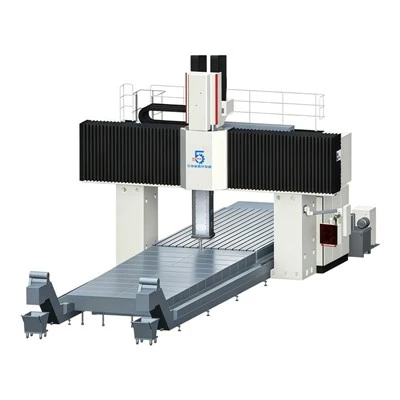
If you’re tired of scrapped parts, long setup times, or machines that can’t hold tolerance for complex jobs, let’s talk. We can walk you through which 5 axis model will work for your shop, explain how we set up the compensation for your specific parts, and answer any questions you have. No sales pitch, just straight talk—we’ve been in this industry long enough to know that trust matters more than a flashy brochure.
Horizontal Boring Mill CNC References
- Ramesh, R., Mannan, M. A., & Poo, A. N. (2000). Error compensation in machine tools — a review. Part I: geometric, cutting-force induced and thermal errors. International Journal of Machine Tools and Manufacture, 40(9), 1235-1257.
- Chen, J. S., & Yuan, J. X. (2008). Rotary axis error compensation for five-axis machine tools. International Journal of Machine Tools and Manufacture, 48(12-13), 1375-1383.
- Slocum, A. H. (1992). Precision Machine Design. SME.
- Wang, Z., & Chen, Y. (2015). Thermal error modeling and compensation for CNC machine tools: A review. Journal of Manufacturing Systems, 37, 594-605.
- Weck, M., & Brecher, C. (2006). Machine Tools: Structure and Dynamics. Wiley-VCH.
5Axis (Shandong) CNC Equipment Co., Ltd.
Address: No.2000, Beixin West Road, Jinghe Street, Tengzhou City, Zaozhuang City, Shandong Province
E-mail: summer@good5axis.com
WebSite: https://www.china5axis.com/
